# Business Setting
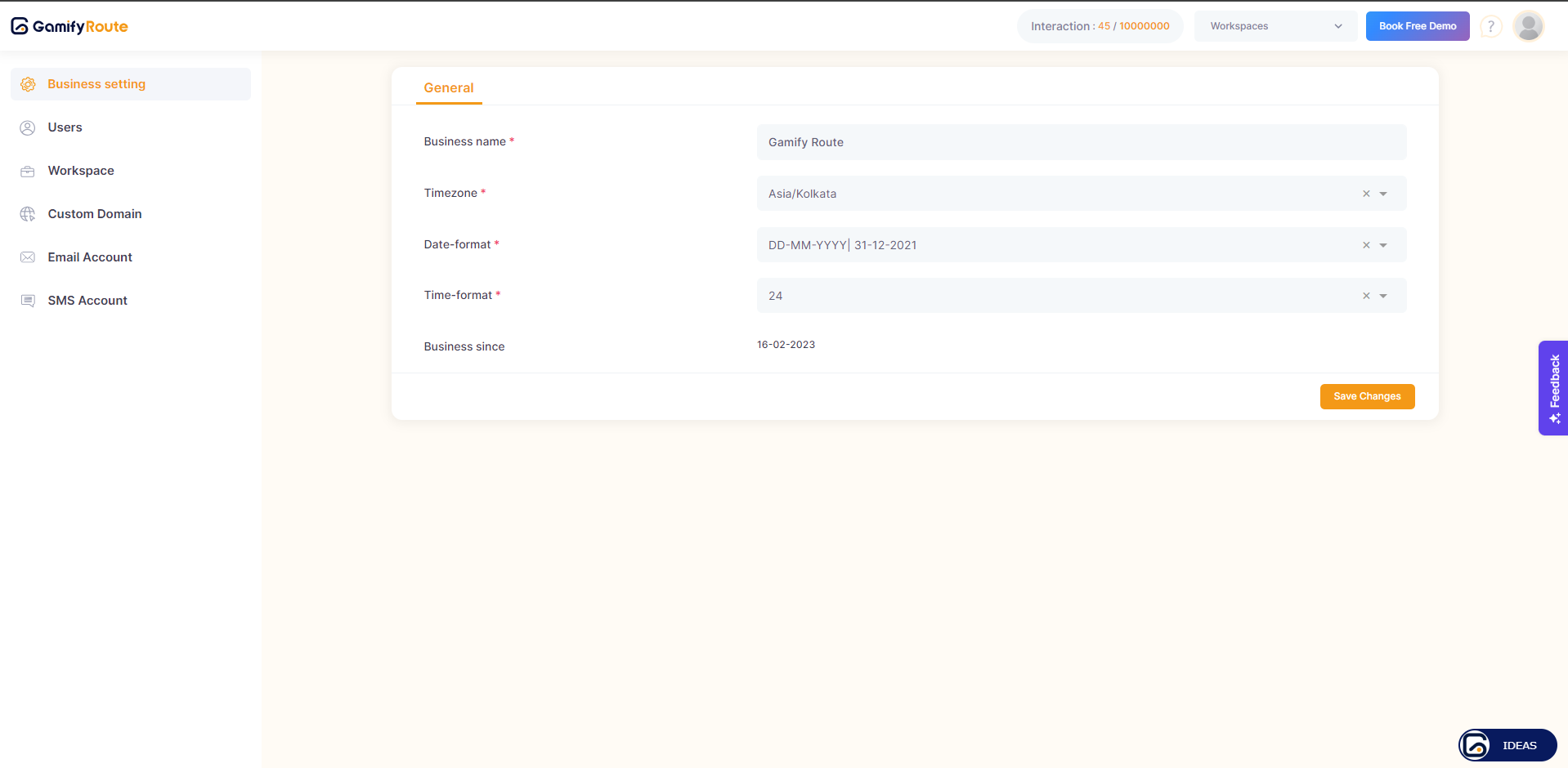
The Business Setting screen in Gamify Route allows you to configure essential details about your business. This screen is designed to ensure that your business information is accurate and up-to-date, which is crucial for the effective functioning of your campaigns and user interactions.
Business setting screen
### Features of the Business Setting Screen
#### 1. General Settings
* **Business Name**: The name of your business as it will appear in the platform.
* **Timezone**: The timezone setting for your business, which affects the scheduling and timing of your campaigns.
* **Date Format**: The format in which dates are displayed (e.g., DD-MM-YYYY).
* **Time Format**: The format for displaying time (e.g., 24-hour format).
* **Business Since**: The date your business was established.
### Accessing the Business Setting Screen
To access the Business Setting screen in Gamify Route, follow these steps:
#### Step 1: Navigate to the Business Setting Section
#### Step 2: View and Edit General Settings
* **Business Name**: Enter or update the name of your business.
* **Timezone**: Select the appropriate timezone for your business operations from the dropdown menu.
* **Date Format**: Choose the preferred date format that suits your business requirements.
* **Time Format**: Select either a 24-hour or 12-hour time format.
* **Business Since**: Confirm or update the date when your business started operations.
#### Step 3: Save Changes
* **Save Button**: After making the necessary changes, click the "Save Changes" button to apply the updates.
### Benefits of the Business Setting Screen
* **Accurate Information**: Ensures that your business information is accurate and up-to-date.
* **Customization**: Allows customization of date and time formats according to your preferences.
* **Improved Scheduling**: Correct timezone settings ensure that your campaign schedules are accurate and align with your business hours.
### Example: Configuring Business Settings
1. **Business Name**: "Gamify Route"
2. **Timezone**: "Asia/Kolkata"
3. **Date Format**: "DD-MM-YYYY"
4. **Time Format**: "24"
5. **Business Since**: "16-02-2023"
After entering the above details, click on the "Save Changes" button to update your business settings.
***
For further assistance, please contact our support team at .
---
# Agent Instructions: Querying This Documentation
If you need additional information that is not directly available in this page, you can query the documentation dynamically by asking a question.
Perform an HTTP GET request on the current page URL with the `ask` query parameter:
```
GET https://docs.gamifyroute.com/kb/business-settings/business-setting.md?ask=
```
The question should be specific, self-contained, and written in natural language.
The response will contain a direct answer to the question and relevant excerpts and sources from the documentation.
Use this mechanism when the answer is not explicitly present in the current page, you need clarification or additional context, or you want to retrieve related documentation sections.