# Reward
## **What is the Reward Section?**
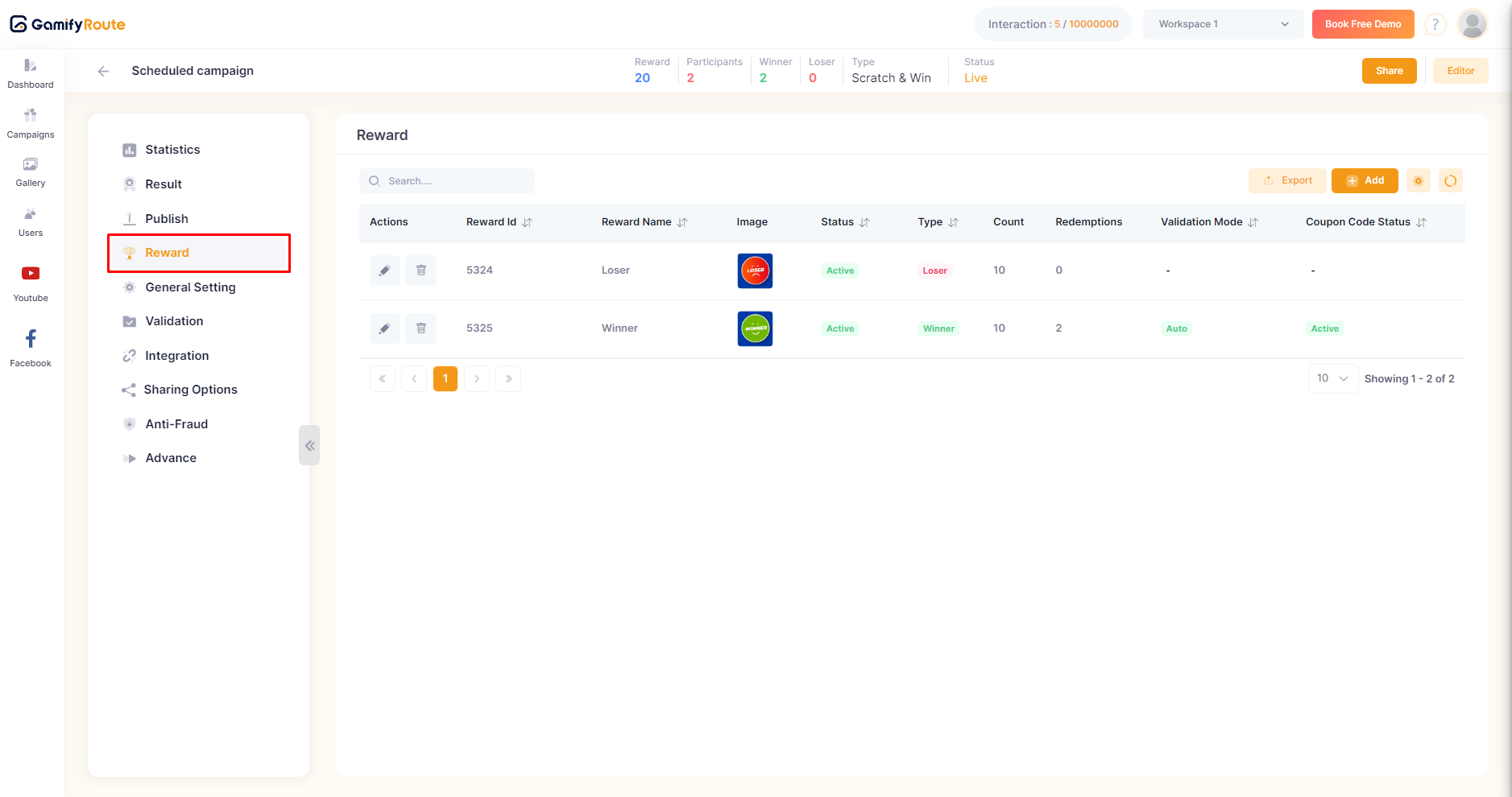
The **Reward** section in Gamify Route is where you can set up and manage rewards for your campaign. This section allows you to create rewards for both winners and losers, ensuring a fair and engaging game experience.
### **How to Use the Reward Section**
* **Navigate to the Reward Section**:
* From the main dashboard, select the campaign you want to set up rewards for.
* In the left-hand menu, click on the **Reward** option.
* **Understanding the Reward Table**:
* The reward table displays the following columns:
* **Reward ID**: Unique identifier for each reward.
* **Reward Name**: Name of the reward.
* **Image**: Visual representation of the reward.
* **Status**: Current status of the reward (active or inactive).
* **Type**: Specifies if the reward is for a winner or loser.
* **Count**: The number of times the reward can be redeemed.
* **Redemption**: Redemption details for the reward.
* **Validation Mode**: Indicates if validation is required for the reward (on or off).
* **Coupon Code Status**: Status of the coupon code (active or inactive).
* **Add a new reward**:
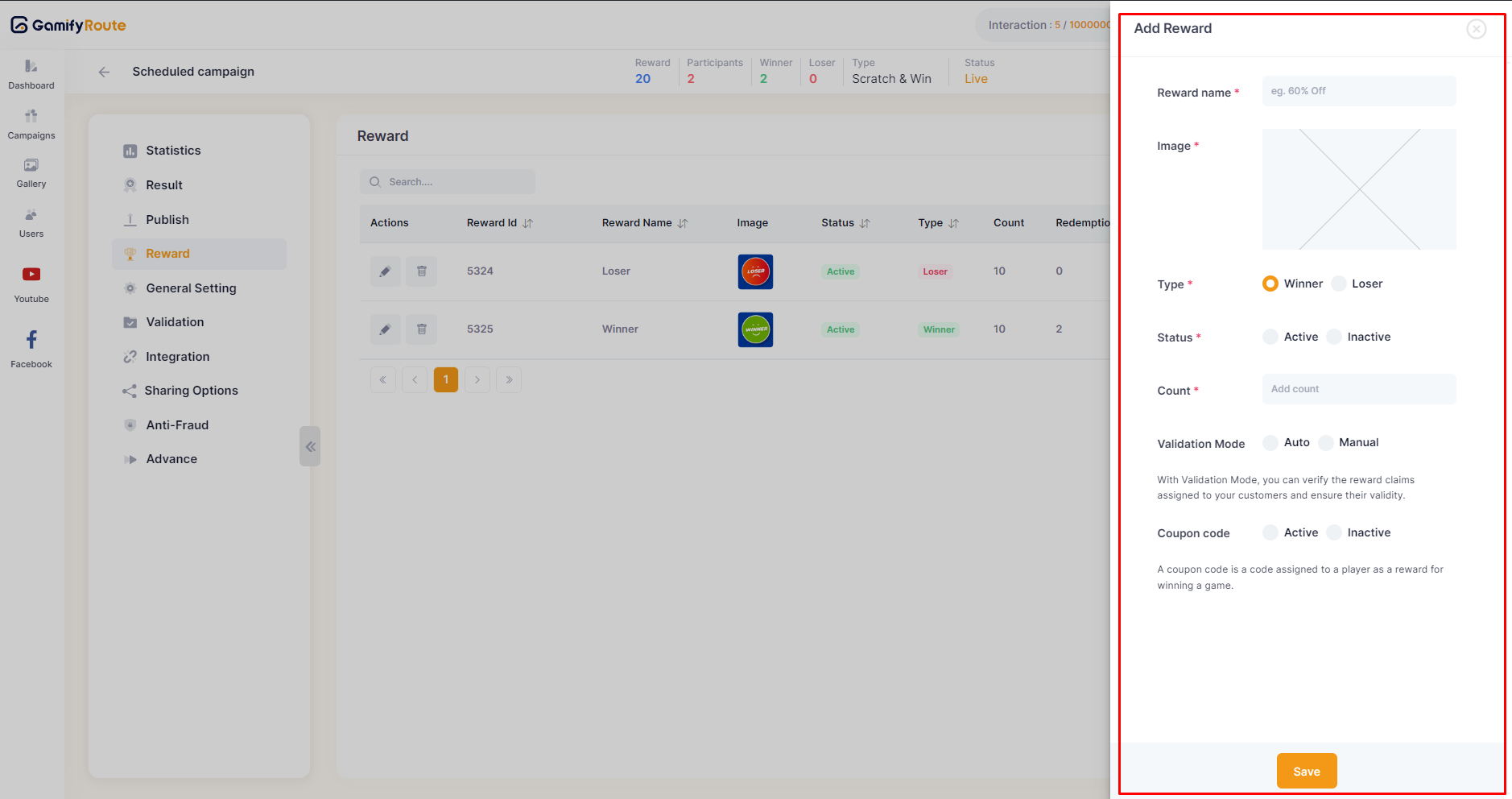
* Click on the **Add** button on the upper right side to open a new side panel on the right side of the screen.
* **Set Reward Details**:
* In the side panel, you can set the following details for the new reward:
* **Reward Name**: Enter the name of the reward.
* **Image**: Upload an image for the reward.
* **Type**: Choose the reward type (winner or loser).
* **Status**: Set the status of the reward (active or inactive).
* **Count**: Specify how many times this reward can be redeemed by participants.
* **Additional Options for Winner Rewards**:
* If the reward type is set to **winner**, two additional options will appear:
* **Validation Mode**: Toggle the validation mode (on or off).
* **Coupon Code**: Set the coupon code status (active or inactive). For more details, go to [here](https://docs.gamifyroute.com/kb/advance-features/coupon-code).
* **Export and Reorder Rewards**:
* Use the **Export** button to download the reward data in your preferred format.
* Use the **Reorder** button to change the order of the rewards.
* **Edit and Delete Reward:**
* There are also options for edit and delete the reward.
***
For further assistance, please contact our support team at .
---
# Agent Instructions: Querying This Documentation
If you need additional information that is not directly available in this page, you can query the documentation dynamically by asking a question.
Perform an HTTP GET request on the current page URL with the `ask` query parameter:
```
GET https://docs.gamifyroute.com/kb/campaign-details/reward.md?ask=
```
The question should be specific, self-contained, and written in natural language.
The response will contain a direct answer to the question and relevant excerpts and sources from the documentation.
Use this mechanism when the answer is not explicitly present in the current page, you need clarification or additional context, or you want to retrieve related documentation sections.