# Dashboard
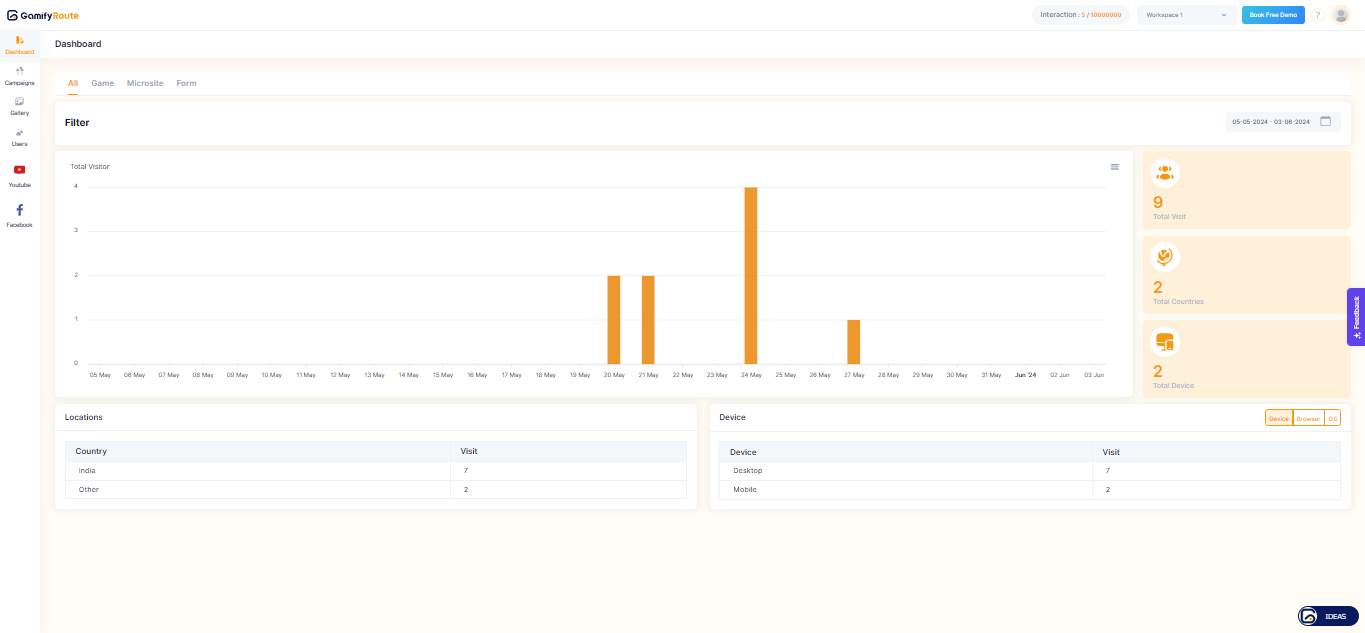
The Dashboard in Gamify Route provides a comprehensive overview of all your campaign performance. It allows you to monitor visitor activity, geographical data, device usage, and more. Here is a detailed guide to help you understand each section of the Dashboard.
Dashboard
### Dashboard Components
#### 1. Filters
At the top of the Dashboard, you can filter the data displayed based on different criteria:
* **All**: Shows data for all activities.
* **Game**: Filters data related to game interactions.
* **Microsite**: Filters data related to microsite interactions.
* **Form**: Filters data related to form submissions.
#### 2. Total Visitors Graph
The graph displays the total number of visitors over a selected date range:
* **Date Range Selector**: Located at the top right corner, allows you to choose the date range for the data displayed on the graph.
* **Graph Details**: Shows the number of visitors per day within the selected date range.
#### 3. Summary Metrics
On the right side of the graph, you will see key metrics:
* **Total Visit**: The total number of visits within the selected date range.
* **Total Countries**: The number of unique countries from which visitors accessed your content.
* **Total Devices**: The number of unique devices used to access your content.
#### 4. Locations
This section provides data on the geographical distribution of your visitors:
* **Country**: The country from which the visits originated.
* **Visit**: The number of visits from each country.
#### 5. Devices
This section shows the types of devices used to access your content:
* **Device**: The type of device (e.g., Desktop, Mobile).
* **Visit**: The number of visits from each device type.
#### 6. Additional Options
Located at the bottom right, you can toggle between different views and options for more detailed insights:
* **Device**: View data based on the type of device used.
* **Browser**: View data based on the browser used by visitors.
* **OS**: View data based on the operating system used by visitors.
***
For further assistance, please contact our support team at .
---
# Agent Instructions: Querying This Documentation
If you need additional information that is not directly available in this page, you can query the documentation dynamically by asking a question.
Perform an HTTP GET request on the current page URL with the `ask` query parameter:
```
GET https://docs.gamifyroute.com/kb/tools/dashboard.md?ask=
```
The question should be specific, self-contained, and written in natural language.
The response will contain a direct answer to the question and relevant excerpts and sources from the documentation.
Use this mechanism when the answer is not explicitly present in the current page, you need clarification or additional context, or you want to retrieve related documentation sections.